Bootstrap Wizard
A Unity Editor tool that simplifies the setup and configuration of the Genies Avatar SDK by automating prerequisite checks and fixes.
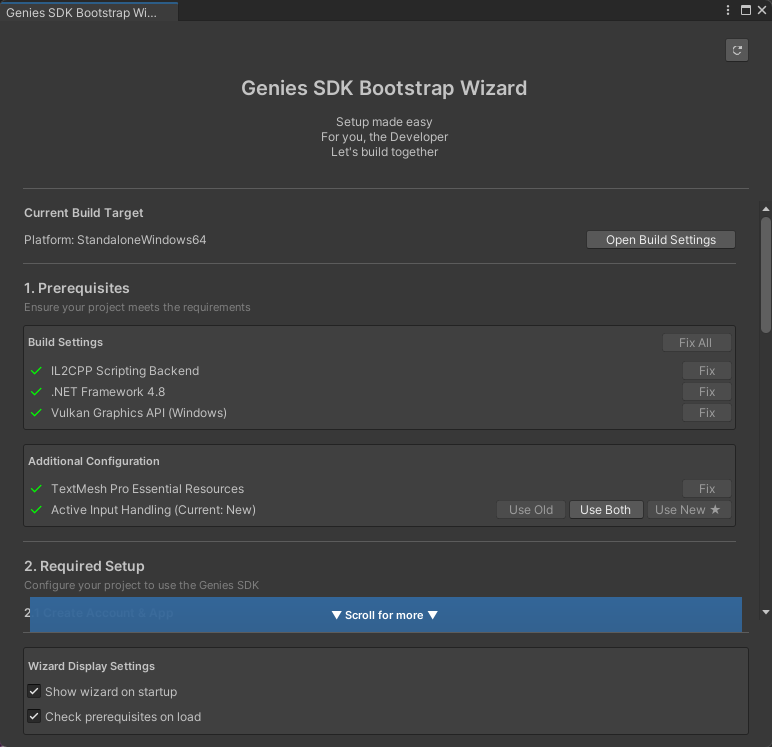
How to Use
Check the Getting Started tutorial to see how to use the Bootstrap Wizard.
Prerequisites
The wizard has different prerequisites depending on the current build platform.
Mac Editor
- IL2CPP Scripting Backend
- .NET Framework 4.8
Windows Editor
- IL2CPP Scripting Backend
- .NET Framework 4.8
- Vulkan Graphics API
iOS Build
- IL2CPP Scripting Backend
- .NET Framework 4.8
Android Build
- IL2CPP Scripting Backend
- .NET Framework 4.8
- Vulkan Graphics API
- ARM64 Architecture
- Minimum Android 12.0 (API Level 31)
- Active Input Handling set to New
Configuration Files
The wizard uses the following configuration files:
Editor/Config/scopes.json: Defines the npm scopes for the Genies package registry- Project
manifest.json: Unity's package manifest (automatically modified by the wizard)
Technical Details
Requirements
- Unity 2022.3 or later
- URP 3D Project ("Universal 3D Template")
- Internet connection for package downloads
- Write access to project
Packages/manifest.json
Troubleshooting
Check the Common Issues page for troubleshooting the Bootstrap Wizard.