Load an Avatar
The Genies Avatar SDK allows developers to load multiple Avatars in a Unity project.
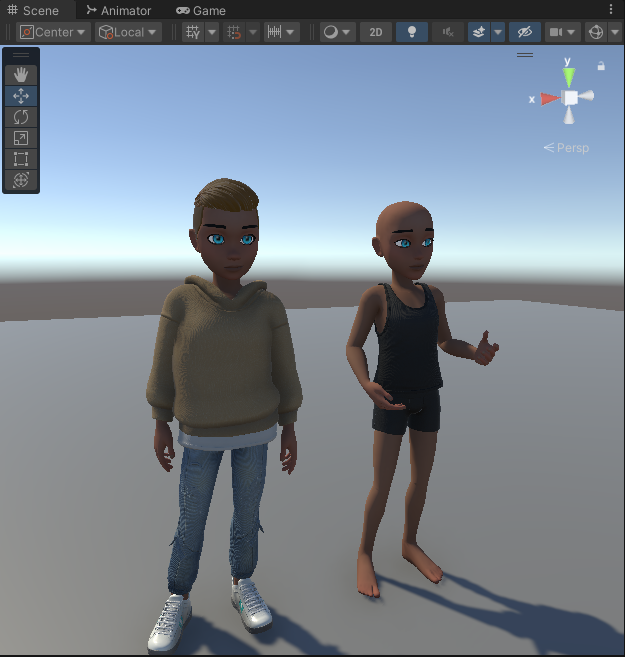
It is recommended to use progressive loading rather than this basic loading for a faster time-to-screen experience. See the Progressive Loading page for more information.
Loading an Avatar Flow
An Avatar is loaded by locally generating the Avatar model given an Avatar definition. This Avatar definition can be the user's global Avatar definition stored in the Genies servers or it can be a local Avatar definition stored in the Unity project.
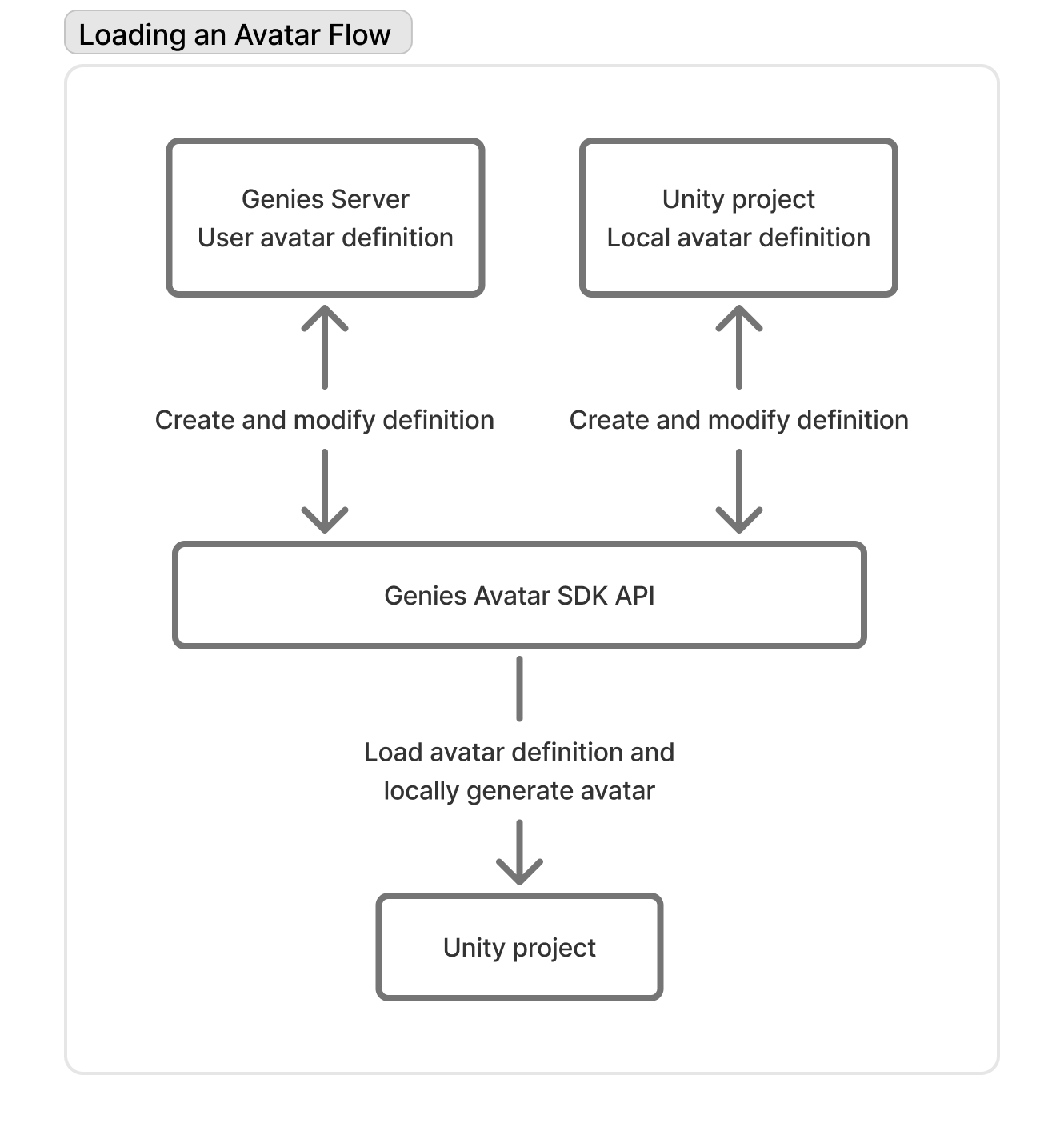
Avatar's definition defines an Avatar's attributes like hair color, waist size, and clothed wearables. It's essentially a stored list of what the Avatar looks like that can be saved and loaded from.
Global vs Local
The difference between global and local Avatars is how the Avatar definition is stored. A user's global Avatar definition is stored in the Genies servers and is interoperable across all Avatar SDK projects. The local Avatar definition is stored in the developer's local project and is managed by the developer.
Loading a Global Avatar
The main use case for loading a user's global Avatar is to represent the player with a persistent Avatar that is interoperable between all Avatar SDK projects and Genies products.
Loading a Local Avatar
The use cases for loading a local Avatar are:
- Having multiple Avatars that represent NPCs in a scene.
- Creating player templates specific to your project.
- Managing your own persistent Avatar specific to your projects.
Load Avatar API
Genies Sdk Avatar Library
using Genies.Sdk;
The Genies.Sdk library contains methods to load a user's global Avatar or a default local Avatar.
Managed Avatar Object
ManagedAvatar avatar;

//Animator bound to the Avatar rig.
Animator animator = avatar.Animator;

//Root GameObject holding the Avatar hierarchy.
GameObject root = avatar.Root;

//The MonoBehaviour component attached to the Avatar's root GameObject.
//Provides a bridge between Unity's GameObject system and this ManagedAvatar wrapper.
ManagedAvatarComponent component = avatar.Component;

//Sub-root GameObject where the visual model is parented.
GameObject modelRoot = avatar.ModelRoot;

//Skeleton root Transform.
Transform skeletonRoot = avatar.SkeletonRoot;

//Function to dispose of the Avatar and cleanly remove it
avatar.Dispose();
The ManagedAvatar object is returned when an Avatar is loaded. It contains references to the Avatar's different components such as the root GameObject and Animator.
Load User Avatar Async Function
AvatarSdk.LoadUserAvatarAsync([string], [Transform], [RuntimeAnimatorController]);
This function will load a user's global Avatar object. It has three optional parameters for the root object's name, the root's parent transform, and the animator controller.
Load User Avatar By User Id Async Function
AvatarSdk.LoadUserAvatarByUserIdAsync(string, [string], [Transform], [RuntimeAnimatorController]);
This function loads a user's global Avatar based on a provided UserId string. It has three optional parameters for the root object's name, the root's parent transform, and the animator controller.
This is useful for loading another user's global Avatar for a multiplayer game.
Load Default Avatar Async Function
AvatarSdk.LoadDefaultAvatarAsync([string], [Transform], [RuntimeAnimatorController])
This function will load a local default Avatar. It has three optional parameters for the root object's name, the root's parent transform, and the animator controller.
Load From Local Avatar Definition Async Function
AvatarSdk.LoadFromLocalAvatarDefinitionAsync(string);
This function will load a local Avatar using an Avatar definition in a JSON file given a profile ID string. The function returns a ManagedAvatar reference or null if it fails.
The SaveAvatarDefinitionLocallyAsync function will save the Avatar definition as a JSON file to the Application.persistentDataPath.
Load From Local Game Object Async Function
AvatarSdk.LoadFromLocalGameObjectAsync(string);
This function will load a local Avatar using an Avatar definition in a GameObject asset given a profile ID string. The function returns a ManagedAvatar reference or null if it fails.
The SaveAvatarDefinitionLocallyAsync function will save the Avatar definition as a GameObject to the Assets > Genies > AvatarEditor > Profiles > Resources folder.
Load Avatar By Definition Async Function
AvatarSdk.LoadAvatarByDefinitionAsync(string, [string], [Transform], [RuntimeAnimatorController]);
This function loads a local Avatar based on a provided JSON definition string. It has three optional parameters for the root object's name, the root's parent transform, and the animator controller. The function returns a ManagedAvatar reference or null if it fails.
Get User Avatar Definition Function
AvatarSdk.GetUserAvatarDefinition([string]);
This function gets a user's global Avatar definition as a JSON string. This fetches the latest user's global Avatar definition from the server or uses the optional user ID string if provided. User must be logged in.
Example
Load and Save a Local Avatar
This example will load and save a local Avatar given a profile Id.
using UnityEngine;
using Genies.Sdk;

public class LoadLocalAvatarTest : MonoBehaviour
{
    [SerializeField] private string profileId;
    private ManagedAvatar localAvatar;

    private void Start()
    {
        //Load the local avatar once the user is logged in
        if(AvatarSdk.IsLoggedIn)
        {
            LoadLocalAvatar();
            return;
        }
        AvatarSdk.Events.UserLoggedIn += LoadLocalAvatar;
    }

    private void OnDestroy()
    {
         AvatarSdk.Events.UserLoggedIn -= LoadLocalAvatar;
    }

    private async void LoadLocalAvatar()
    {
        Debug.Log("Loading Local Avatar");
        localAvatar = await AvatarSdk.LoadFromLocalAvatarDefinitionAsync(profileId);
        if(localAvatar != null)
        {
            //Save the local avatar once its loaded successfully
            Debug.Log("Local Avatar Loaded Successfully");
            SaveLocalAvatar();
        }
        else
        {
            Debug.Log("Local Avatar Loaded Failed");
        }
    }

    private async void SaveLocalAvatar()
    {
        Debug.Log("Saving Local Avatar");
        await AvatarSdk.SaveAvatarDefinitionLocallyAsync(localAvatar, profileId);
        Debug.Log("Local Avatar Saved");
    }
}
Load a User's Global Avatar
This example will load the user's global Avatar.
using UnityEngine;
using Genies.Sdk;

public class LoadUserAvatarTest : MonoBehaviour
{
    [SerializeField] private string avatarName = "MyAvatar";
    [SerializeField] private Transform parentTransform = null;
    [SerializeField] private RuntimeAnimatorController animatorController = null;

    private void Start()
    {
        //Load the user avatar once the user is logged in
        if(AvatarSdk.IsLoggedIn)
        {
            LoadUserAvatar();
            return;
        }
        AvatarSdk.Events.UserLoggedIn += LoadUserAvatar;
    }

    private void OnDestroy()
    {
         AvatarSdk.Events.UserLoggedIn -= LoadUserAvatar;
    }

    private async void LoadUserAvatar()
    {
        Debug.Log("Loading User Avatar");
        ManagedAvatar userAvatar = await AvatarSdk.LoadUserAvatarAsync(avatarName, parentTransform, animatorController);
        if(userAvatar != null)
        {
            Debug.Log("User Avatar Loaded Successfully");
        }
        else
        {
            Debug.Log("User Avatar Loaded Failed");
        }
    }
}